> ## Documentation Index
> Fetch the complete documentation index at: https://docs.sellfern.com/llms.txt
> Use this file to discover all available pages before exploring further.
# Operating Expenses
> Record non-order business costs so Sellfern can include overhead in product analytics and financial reporting.
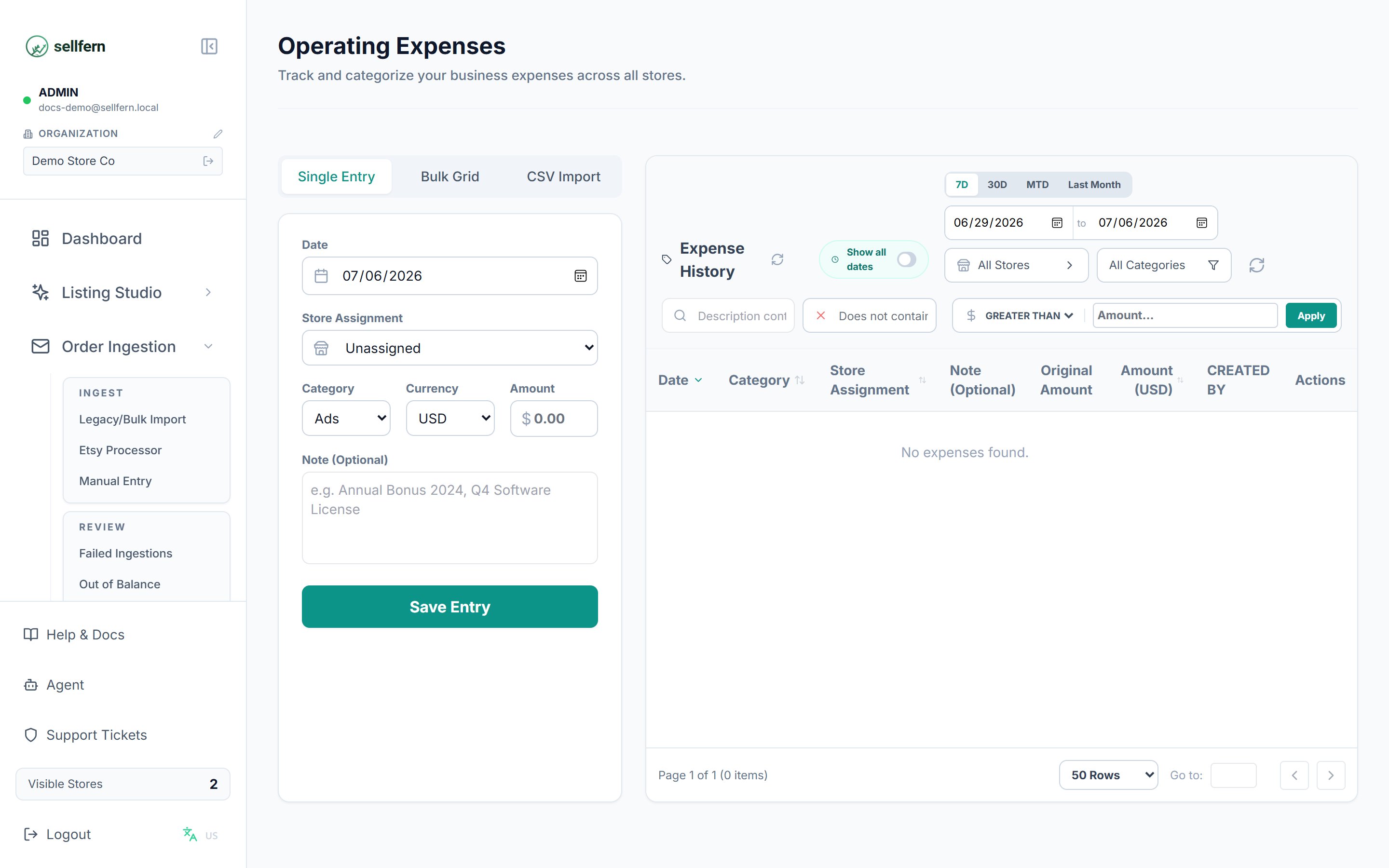
Operating Expenses captures overhead and indirect costs that are not tied to individual orders but still affect your bottom line. Costs like advertising spend, software subscriptions, office lease, and services belong here. Analytics subtracts these expenses from Gross Profit to calculate Net Profit for signed-in product users.
 Operating Expenses can also be automated through the public API. Use `expenses:write` to create expenses and `expenses:read` to list or retrieve them.
## What belongs in Operating Expenses
Use Operating Expenses for costs that support business operations but are not directly attached to a specific order:
* Ad spend, including Facebook, Google, Etsy Ads, and similar channels.
* Software subscriptions and tools.
* Logistics and service fees.
* Office costs and other overhead.
* Custom categories you define.
Production costs tied to a specific order, such as supplier base costs, belong in the Ledger rather than Operating Expenses.
## Setting up expense categories
Before recording expenses, configure categories in **Settings → Expense Categories**.
* Categories are split into **Operating** and **Payroll** groups.
* You can drag and drop categories to reorder dropdown menus.
* Mark a category as **Inactive** if you no longer use it. Historical data remains preserved.
* Only admin users can create or modify categories.
## Recording an expense
You can add expenses four ways:
* **Single Entry** — enter one expense at a time.
* **Bulk Entry** — enter multiple expenses in a grid.
* **CSV Upload** — upload a spreadsheet of expenses from another system or bank export.
* **API** — create single or bulk expenses from external systems using the Expenses API.
### Required fields
Every expense entry requires:
* **Date** — when the expense occurred.
* **Category** — select a configured category, or choose **Other** and enter a custom label.
* **Amount** — the cost in USD.
You can optionally assign an expense to a specific **Store**, or leave it blank to apply as a consolidated expense. Use **Description** for notes.
When entering expenses manually or via bulk entry, Sellfern checks for potential duplicates with the same date, category, and store. Review warnings before saving.
## Ad spend and VAT
A **5% VAT is automatically added** to expenses recorded under an Ads category. VAT is calculated and tracked separately so Analytics can show both net ad spend and the VAT component.
## Recurring expenses
For predictable costs, create a recurring expense. Sellfern applies the same amount, category, and store assignment on the schedule you configure.
## How expenses affect Analytics
Operating expenses feed into Net Profit calculations.
```text theme={null}
Net Profit = Gross Profit - Operating Expenses
```
For accurate reporting, expenses must be logged for the same time period you analyze. If you run a report for October but have not recorded October ad spend, Net Profit can appear higher than expected.
## API automation
Use the API for system-to-system expense imports from accounting tools, bank exports, payroll processors, or workflow automation platforms.
```bash theme={null}
curl https://api.sellfern.com/expenses \
-H "x-api-key: $SELLFERN_API_KEY" \
-H "Content-Type: application/json" \
-H "Idempotency-Key: expense-2026-06-01-software" \
-d '{
"category": "Software",
"amount": 49.99,
"date": "2026-06-01",
"currency": "USD",
"description": "Monthly design tool subscription"
}'
```
For payroll imports, send a payroll category plus the optional payroll fields such as `base_amount`, `bhxh_amount`, `bhxh_rate`, `bhxh_type`, and `employee_name`.
Operating Expenses can also be automated through the public API. Use `expenses:write` to create expenses and `expenses:read` to list or retrieve them.
## What belongs in Operating Expenses
Use Operating Expenses for costs that support business operations but are not directly attached to a specific order:
* Ad spend, including Facebook, Google, Etsy Ads, and similar channels.
* Software subscriptions and tools.
* Logistics and service fees.
* Office costs and other overhead.
* Custom categories you define.
Production costs tied to a specific order, such as supplier base costs, belong in the Ledger rather than Operating Expenses.
## Setting up expense categories
Before recording expenses, configure categories in **Settings → Expense Categories**.
* Categories are split into **Operating** and **Payroll** groups.
* You can drag and drop categories to reorder dropdown menus.
* Mark a category as **Inactive** if you no longer use it. Historical data remains preserved.
* Only admin users can create or modify categories.
## Recording an expense
You can add expenses four ways:
* **Single Entry** — enter one expense at a time.
* **Bulk Entry** — enter multiple expenses in a grid.
* **CSV Upload** — upload a spreadsheet of expenses from another system or bank export.
* **API** — create single or bulk expenses from external systems using the Expenses API.
### Required fields
Every expense entry requires:
* **Date** — when the expense occurred.
* **Category** — select a configured category, or choose **Other** and enter a custom label.
* **Amount** — the cost in USD.
You can optionally assign an expense to a specific **Store**, or leave it blank to apply as a consolidated expense. Use **Description** for notes.
When entering expenses manually or via bulk entry, Sellfern checks for potential duplicates with the same date, category, and store. Review warnings before saving.
## Ad spend and VAT
A **5% VAT is automatically added** to expenses recorded under an Ads category. VAT is calculated and tracked separately so Analytics can show both net ad spend and the VAT component.
## Recurring expenses
For predictable costs, create a recurring expense. Sellfern applies the same amount, category, and store assignment on the schedule you configure.
## How expenses affect Analytics
Operating expenses feed into Net Profit calculations.
```text theme={null}
Net Profit = Gross Profit - Operating Expenses
```
For accurate reporting, expenses must be logged for the same time period you analyze. If you run a report for October but have not recorded October ad spend, Net Profit can appear higher than expected.
## API automation
Use the API for system-to-system expense imports from accounting tools, bank exports, payroll processors, or workflow automation platforms.
```bash theme={null}
curl https://api.sellfern.com/expenses \
-H "x-api-key: $SELLFERN_API_KEY" \
-H "Content-Type: application/json" \
-H "Idempotency-Key: expense-2026-06-01-software" \
-d '{
"category": "Software",
"amount": 49.99,
"date": "2026-06-01",
"currency": "USD",
"description": "Monthly design tool subscription"
}'
```
For payroll imports, send a payroll category plus the optional payroll fields such as `base_amount`, `bhxh_amount`, `bhxh_rate`, `bhxh_type`, and `employee_name`.